Photo Credit: Adobe
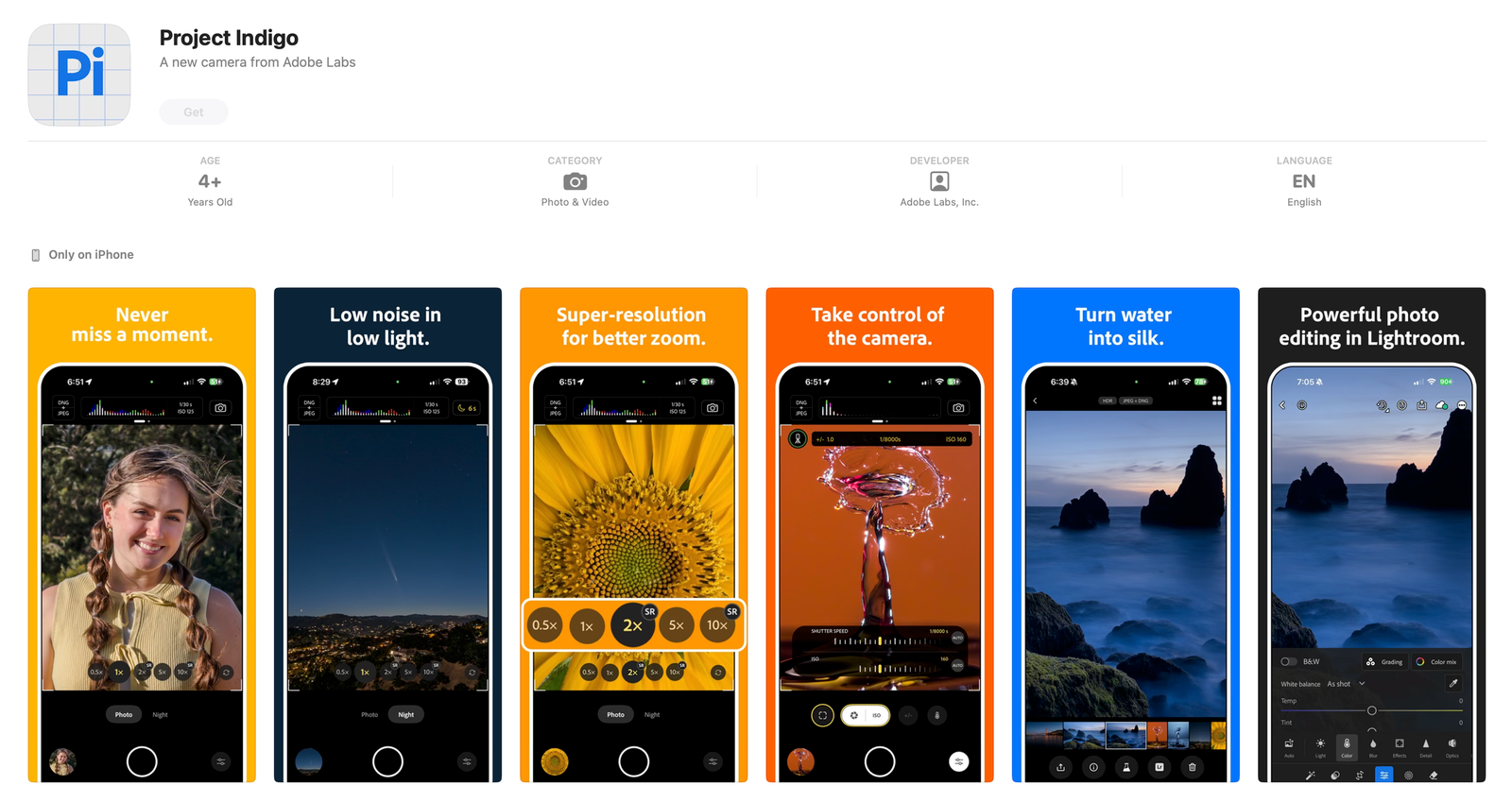
Adobe has stepped into the high-performance mobile photography arena with Project Indigo, a groundbreaking iPhone camera app designed to deliver DSLR-quality results through advanced computational photography. Developed by Adobe Labs, this app harnesses cutting-edge imaging science and artificial intelligence to give iPhone users professional-level control and image quality—all for free.
A Powerhouse Team Behind the Vision
At the core of Project Indigo is an elite team led by Marc Levoy, the mastermind behind the computational photography engine of Google’s Pixel phones, and Florian Kainz, a senior scientist known for pioneering HDR imaging technologies. Their mission: to push mobile photography beyond traditional limits by fusing camera hardware with intelligent image processing and AI.
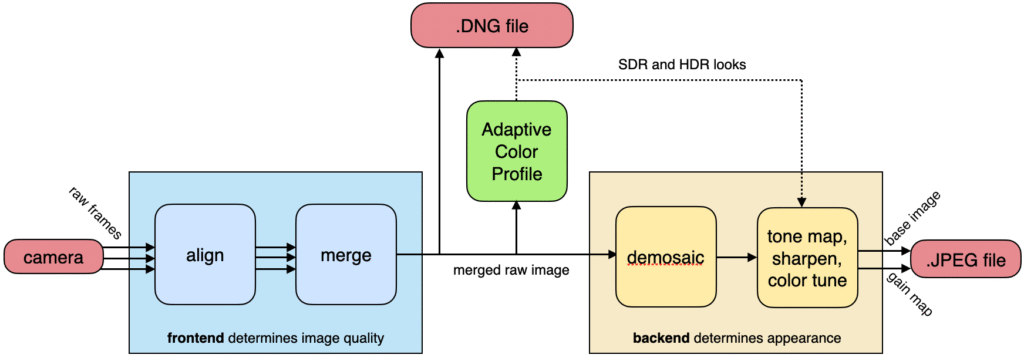
A simplified depiction of Indigo’s image processing pipeline. The frontend (at left) aligns and merges a stream of raw frames flowing from the camera. The merged but still (nearly) raw image is optionally stored as an Adobe DNG (Digital Negative) file (red box at top). The look computed by our Adaptive Color Profile AI (green box) is stored in the DNG file alongside the pixels, but doesn’t change them. The output of this AI also drives the backend (at right), which consists of tone mapping, sharpening, and color adjustments. These operations do change the pixel values. The modified pixels are compressed and stored in the JPEG file. The baking of adjustments into pixels is why editing a JPEG is always harder than editing a DNG.
Availability and Compatibility
Project Indigo is available as a free download on the App Store and does not require an Adobe account to use. It currently supports:
- iPhone 12 Pro / Pro Max
- iPhone 13 Pro / Pro Max
- All iPhone 14 models
- All iPhone 15 models
While compatible with a wide range of devices, Indigo performs best on iPhone 15 Pro and later due to the more advanced computational demands of its features.
How It Works: Multi-Frame Magic
Unlike standard photo apps that capture a single image per shot, Indigo records a burst of up to 32 frames and uses machine learning and sensor data to align and merge them into one master image. This stack-based method delivers:
- Significantly reduced noise, even in low light
- Increased dynamic range, preserving highlight and shadow details
- Super-resolution zoom, using micro-movements from hand tremors to extract more detail—without creating AI-generated artifacts
The final output is a 16-bit RAW DNG file enriched with Adobe’s custom color profiles and a high-quality JPEG preview, optimized for seamless post-processing in apps like Lightroom.
Pro Controls and Creative Modes
Project Indigo offers full manual control over key camera settings including shutter speed, ISO, focus, white balance, exposure compensation, and the number of frames per burst. Users can switch between several shooting modes:
- Photo Mode: Zero shutter lag with real-time frame buffering
- Night Mode: For low-light scenes, using extended exposure and optical image stabilization
- Long Exposure Mode: Ideal for creative effects like soft flowing water or light trails
- Super-Resolution Zoom: Automatically activated when digitally zooming for better clarity
On-screen overlays like histograms, zebra stripes for overexposure, and leveling guides provide real-time feedback for precision shooting.
Experimental AI Features
Indigo includes a “Technology Preview” section showcasing next-generation AI tools:
- AI Denoise: Applies advanced noise reduction directly to DNG files
- Reflection Removal: Removes glass reflections in window or aquarium shots with one tap
These features are early-stage but hint at how Adobe is experimenting with AI in mobile photography.
What’s Coming Next
Adobe is treating Indigo as a live R&D platform, with more features planned:
- Portrait mode
- Video capture
- Bracketing (exposure, focus)
- Panorama and timelapse modes
- Eventual Android support
The app also offers deep ecosystem integration, letting users send RAW files directly to Lightroom Mobile or open them in Photoshop on desktop for full-scale editing.
Why It Matters
Project Indigo is a bold reimagining of what mobile cameras can do. It stands out for several reasons:
- Professional-grade image quality from a phone, using real-time computational intelligence
- Transparent and non-intrusive AI, focused on enhancement rather than over-stylization
- Seamless Adobe workflow, from capture to editing
- Frictionless access—it’s free, no login required, and immediately powerful
Final Take
Project Indigo represents Adobe’s commitment to rethinking photography from the ground up, combining scientific precision with creative freedom. For photographers who demand both control and quality—and especially those within the Apple ecosystem—this is more than just another camera app. It’s a glimpse into the future of mobile imaging.
Whether you’re a photography enthusiast or a professional looking for a high-quality on-the-go solution, Project Indigo turns your iPhone into a true computational powerhouse.