Microsoft has begun shipping a new suite of lightweight Microsoft 365 Companions, including People, File Search, and Calendar, directly integrated into the Windows 11 taskbar. The rollout targets business and enterprise Microsoft 365 users starting this month.
What Are These Companions?
Microsoft calls them “companions”—miniaturized tools designed to minimize context-switching and streamline daily workflows. They launch automatically with Windows 11 and remain accessible at the taskbar, giving users access to critical functionality without needing to open full Microsoft 365 programs.
1. People Companion
Provides fast access to contacts within an organization. You can search for colleagues by name, role, or location, view the organizational hierarchy, and start conversations via Teams, email, or calls—all without switching to full programs.
2. File Search Companion
Offers unified search for your Microsoft 365 files—whether stored in OneDrive, SharePoint, Teams, or Outlook. You can preview documents, filter results by file type or people involved, and share or copy links directly from the interface.
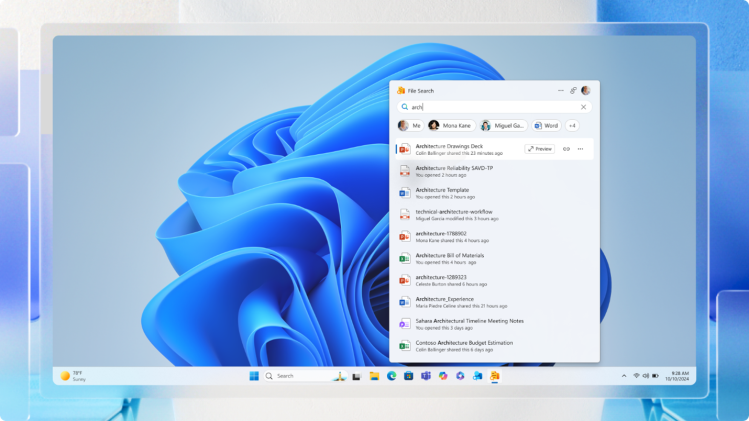
3. Calendar Companion
Gives quick access to your Microsoft 365 calendar from the taskbar for a fast view of upcoming events. You can toggle between day and agenda formats, search for meeting titles or organizers, and join scheduled Teams meetings instantly.
Why Microsoft is Rolling It Out
Announced last year at Ignite, these companions aim to reduce workflow disruptions by delivering high-value tools directly within reach—especially useful for professionals juggling multiple tasks.
PC World notes that they go beyond traditional widgets: “They’re great if your screen real estate is reserved for other tools… quick and less disruptive.”
Availability & Deployment
Initially available to Microsoft 365 Business and Enterprise users in preview and beta channels, these companions are now being broadly deployed to eligible Windows 11 systems via the Microsoft 365 update pipeline.
Admins can manage deployment—companions download and launch at startup by default, but can be disabled in the Microsoft 365 admin center under Device Configuration. Users can also opt out individually via settings.
Enterprise & IT Considerations
These additions have implications for IT management and security teams. Since they access corporate data via Microsoft Graph, administrators may need to review policies for data governance, deployment control, and privacy compliance.
Access Requirements
To receive them, users must:
- Run Windows 11
- Be part of the Microsoft 365 Insider Program (Business/Enterprise channels)
- Have Microsoft 365 desktop suite installed
- For People, have a plan that includes Microsoft Teams
How to Get the Most Out of Them
- Pin to taskbar for one-click access
- Use search and filters in File Search for faster document retrieval
- In Calendar, join meetings instantly without switching views
- In People, start communications without navigating away from your current workflow
Looking Ahead
Currently designed for enterprise users, these companions show Microsoft’s intent to embed convenient micro-tools directly into Windows 11. Future AI-driven features—potentially integrating Copilot—could make them even more essential for productivity.
Photo Credit: Microsoft